A better way to capture sound
Your moments deserve to be heard.
A beautifully simple voice recorder for ideas, lectures, conversations, and the moments you want to remember.
Designed for Android. Record locally. Stay in control.
The app
Four screens. Each one does a single job well.
Real screens from ClearRec, captured from the app itself.
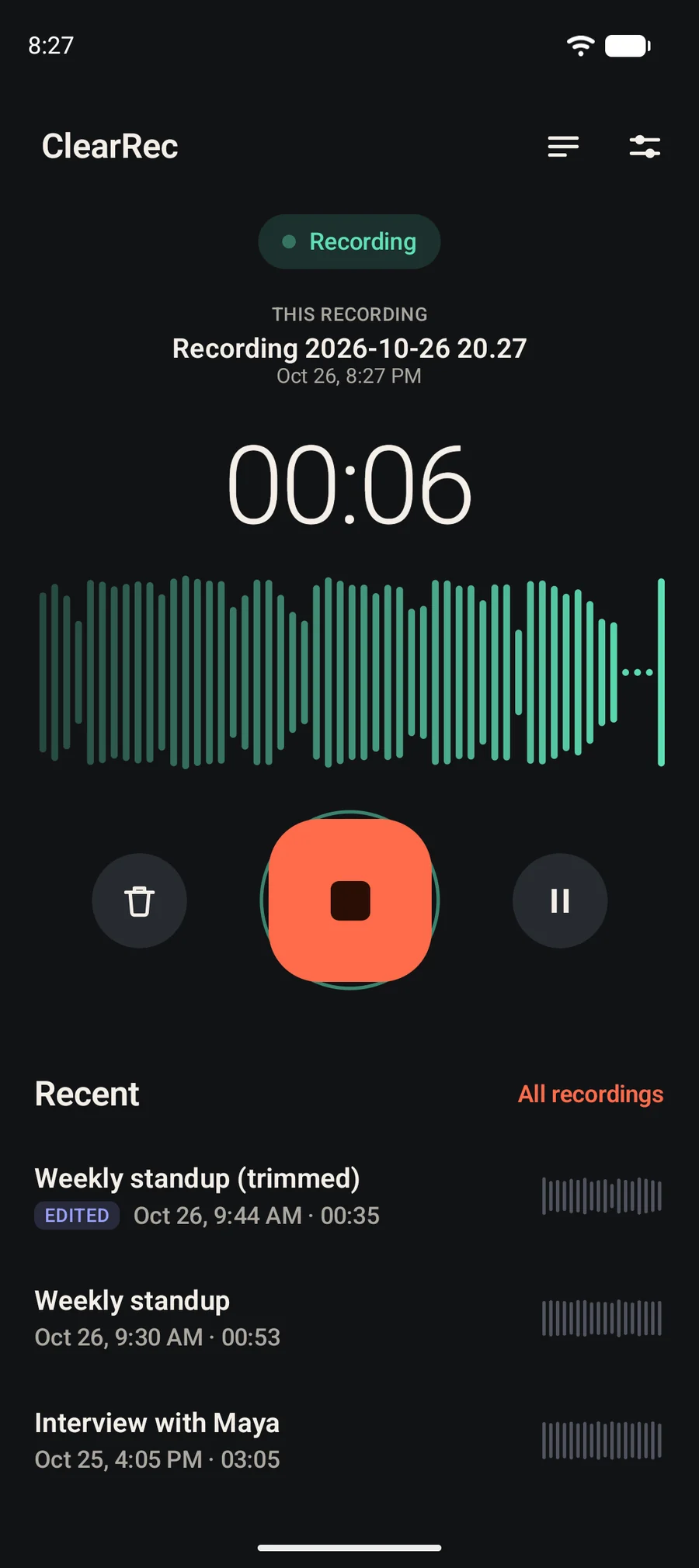
Start with a single tap.
A large timer, a live waveform driven by the microphone's real input level, and one clear control. The state is always named: Ready, Recording, Paused, Saving or Saved.
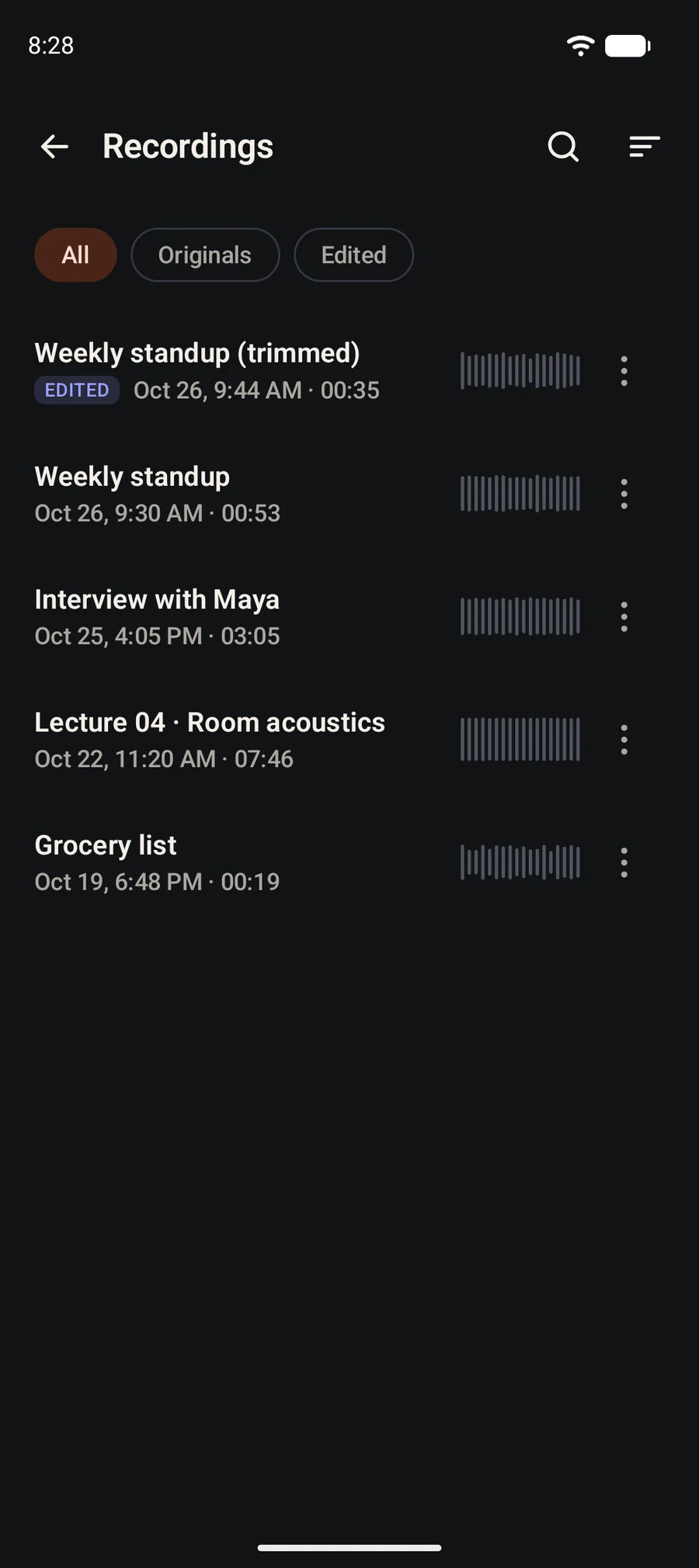
Keep every recording within reach.
Search by name, sort four ways, and filter between originals and edited versions. Every row shows its date, length and a waveform decoded from the audio.
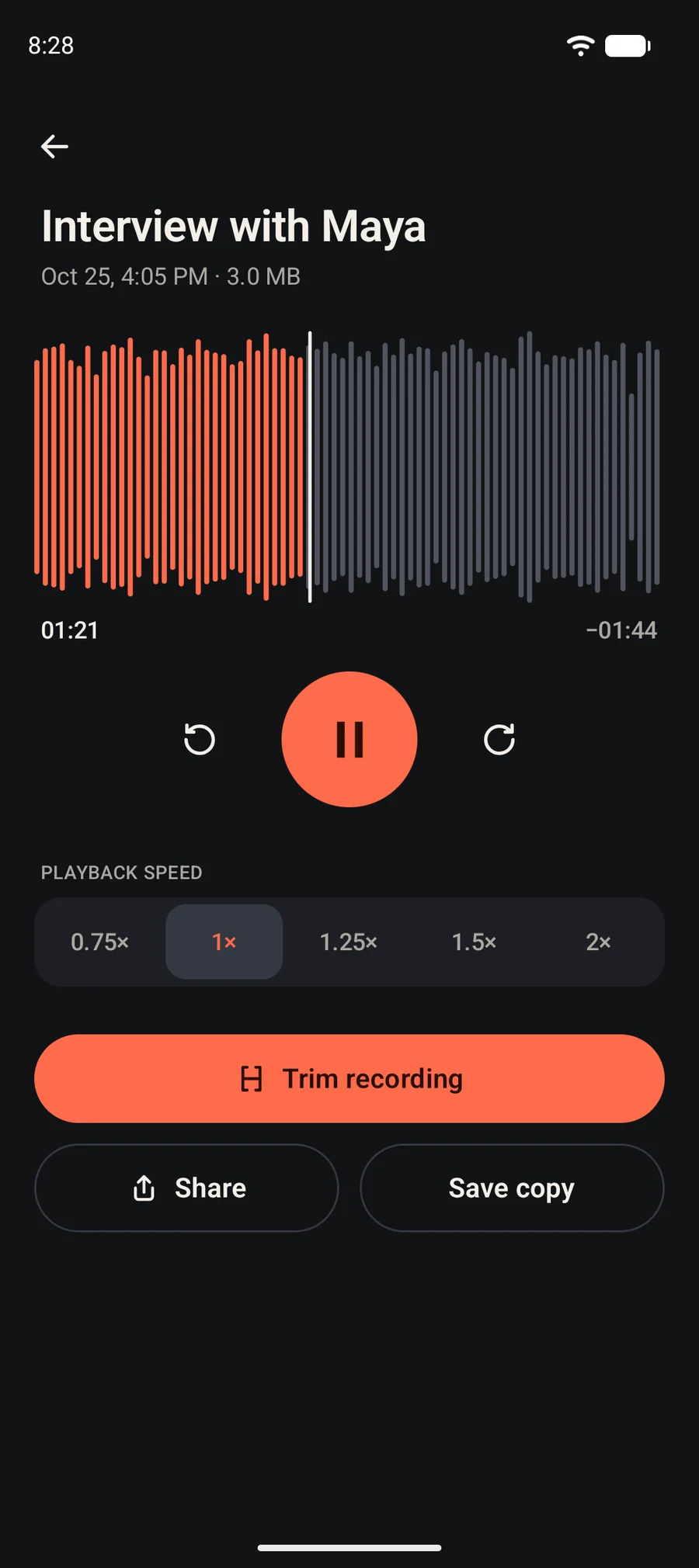
Find the moment you need.
Tap or drag the waveform to seek, skip ten seconds either way, and listen at 0.75×, 1×, 1.25×, 1.5× or 2× speed.
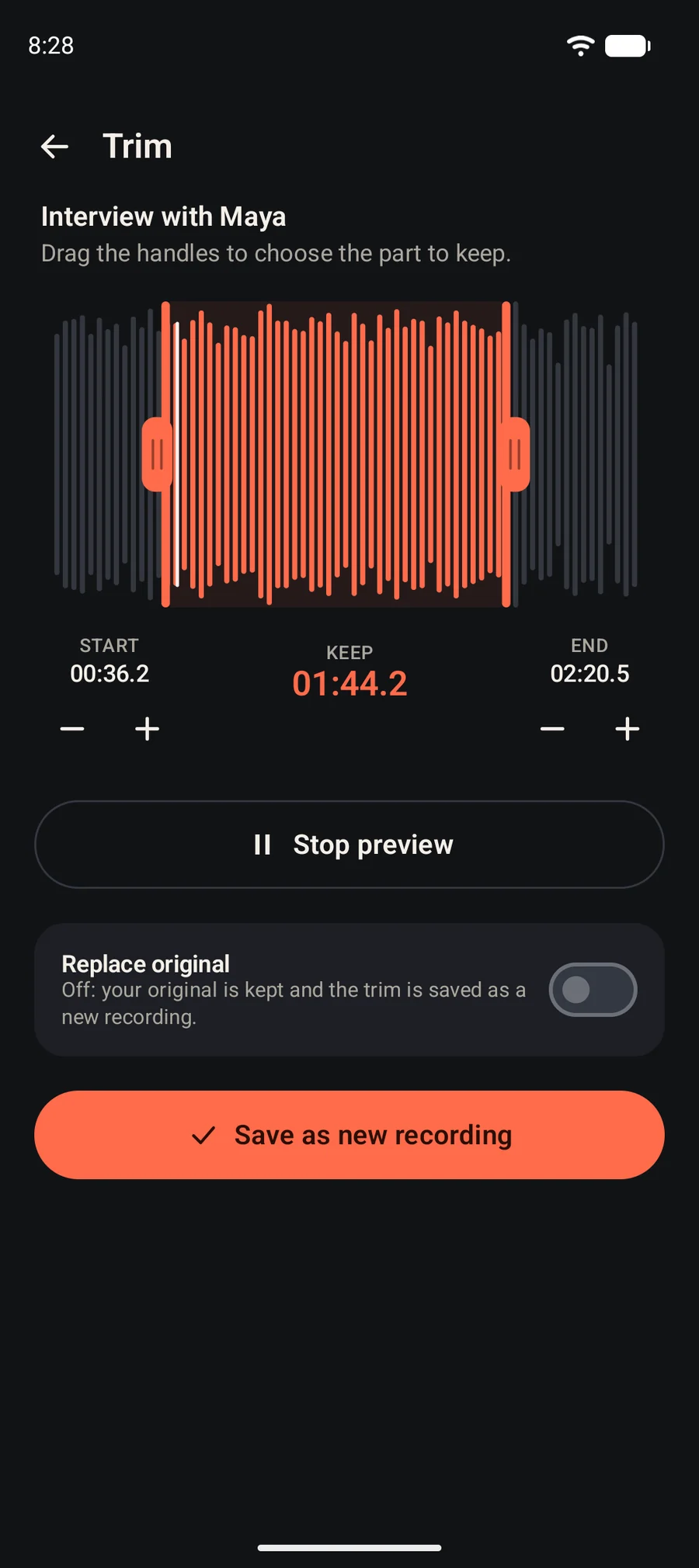
Keep the part that matters.
Drag two handles, nudge them in tenths of a second, preview your selection, then save it as a new recording. Your original stays untouched unless you choose to replace it.
Features
Everything a recorder should do. Nothing it shouldn't.
Built around the moments when you press record and want it to simply work.
Recording, without the clutter.
One clear control, a timer you can read at arm's length, and a waveform that follows your voice. Pause and resume stay in the same file, and discarding always asks first.
Stay in your flow.
While you record, a notification keeps Pause, Resume and Stop one pull-down away, so recording can continue while you use other apps, where Android and your device allow it.
Your audio, organized.
Name, date, length and a real waveform for every recording. Search by name, sort four ways, rename, and tell originals from edits at a glance.
Listen at your own pace.
Tap or drag the waveform to seek exactly where you want, skip ten seconds, and play from 0.75× to 2× speed.
Keep the part you need.
Drag two handles, preview the selection, and save it as a new recording. The audio is copied rather than re-encoded, so quality isn't lost, and your original stays put.
Share on your terms.
Recordings are standard .m4a files. Send them with Android's share sheet or save a copy wherever you choose. Nothing leaves the app until you say so.
Try the interface
Feel the rhythm of a recording.
This is a demonstration of ClearRec's recording states with simulated audio. Your microphone is never used, and nothing is recorded or uploaded.
Demonstration. Simulated audio, no microphone.
This demonstration needs JavaScript. In the app, one tap starts recording.
Press the button, then try pause and stop.
Privacy
Your recordings stay yours.
ClearRec is designed around local recording and simple file management. Your audio is stored on your device rather than uploaded to a ClearRec cloud account. You choose when to export or share a file.
What this version asks Android for
- Microphone
- Notifications
- Foreground service (microphone)
- Keep the processor awake while recording
Stored on your device
Recordings live in storage private to the app, and Android's backup is switched off for them.
No account, no ads
There is nothing to sign in to, and no advertising in the app.
You decide what leaves
Share and Save copy only run when you tap them. The stored recording is never moved or changed.
The microphone is never a secret
While recording, ClearRec shows a notification, and Android shows its own microphone indicator.
How it works
From open to saved in three steps.
- 01
Open ClearRec.
No sign-in, no setup screens. The first time you record, Android asks for microphone access.
- 02
Tap Record.
Capture the audio you need. Pause and resume without starting a new file, then stop to save.
- 03
Replay, organize, trim, or share.
Listen at your pace, rename or search your library, trim the part you want, and share through Android.
Made for
For the things worth remembering.
Please ask for consent before recording other people, and follow the laws where you are.
Students and lectures
Capture a lecture, then slow dense passages to 0.75× or trim a recording down to the part you need to revise.
Work notes and discussions
Dictate follow-ups to yourself or record meetings you are part of, and find them later by name and date.
Personal voice memos
Say it before you lose it: a shopping list, a thought on a walk, a reminder for tomorrow.
Creative ideas and audio references
Hum a melody, sketch a script aloud, or keep a reference take, with a lossless trim that never degrades the sound.
FAQ
Good to know.
What is ClearRec?
ClearRec is an Android voice recorder for notes, lectures and ideas. It records with your device's microphone, keeps your recordings in a library, and lets you play, rename, trim and share them.
Does ClearRec require an account?
No. There is no sign-in and no ClearRec cloud account.
Where are recordings stored?
On your device, in storage that is private to the app. ClearRec does not upload them, and Android's cloud backup is turned off for this data. A recording leaves the app only when you choose Share or Save copy.
Can I record while using other apps?
ClearRec records using an Android foreground service and shows a notification while the microphone is in use, which lets recording continue while you use other apps. Behavior depends on your device and Android version, and Android can still interrupt recording, for example when a call or another app takes the microphone. In that case ClearRec pauses the recording.
Can I play recordings at different speeds?
Yes: 0.75×, 1×, 1.25×, 1.5× and 2×.
Can I trim a recording?
Yes. Choose a start and end, preview the selection, and save it as a new recording. Your original is kept unless you switch on Replace original and confirm. Trimming copies the compressed audio without re-encoding it.
Can I share recordings with other apps?
Yes. Share uses Android's standard share sheet, and Save copy lets you pick where a copy is written. Recordings are standard .m4a (AAC) files.
Does ClearRec require an internet connection?
No. Recording, playback, trimming and the library all work without a connection, and this version of the app does not request Android's internet permission.
Does ClearRec record phone calls?
No. ClearRec is a microphone voice recorder, not a phone-call recorder. It does not capture calls or audio from other apps.
Which Android devices are supported?
Android 8.0 (API 26) or newer, on a device with a microphone. Behavior can vary between manufacturers, so check the Google Play listing for compatibility.
How can I contact support?
Support details are listed on the ClearRec Google Play listing.
How can I delete my recordings?
Open the library, tap the ⋮ menu on a recording, and choose Delete. You will be asked to confirm, and the file is removed from your device. Uninstalling the app removes everything it stored. Copies you shared or saved elsewhere are separate and must be deleted where you put them.
Make room for every idea.
A focused voice recording experience, ready when inspiration arrives.